Installing the Geometris 68 Series
Before you start:
Make sure you have what you need:
- 1x Geometris 68 Series
- Wiring kit
How to Install the Geometris 68 Series:
- Connect black wire to ground.
- Connect red wire to + 12V.
- Connect brown wire to ignition (optional).
- Device will start blinking red. Wait for device to blink green.
All Geometris devices contain high-resolution accelerometers which can detect tilt, acceleration, and pulses to report driver behavior, it is important to install the device like the following:
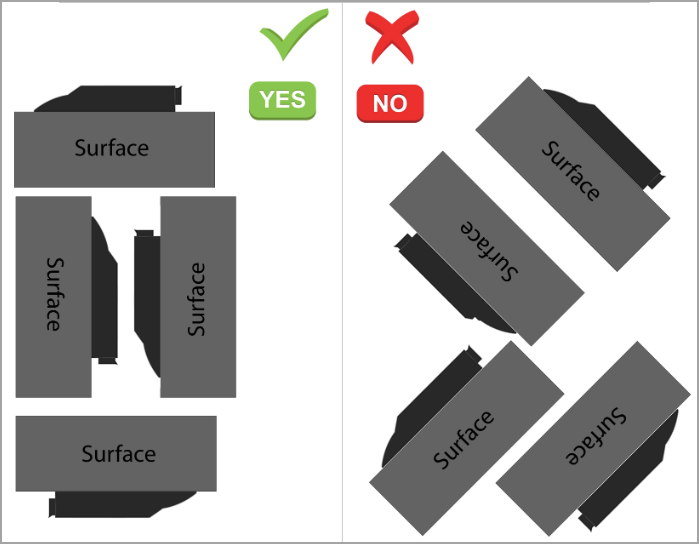

Note:
- There should be no metal located above the device, as this may interfere with the GPS signal.
- Make sure that the unit is kept safe from direct exposure to the elements (sun, heat, etc) and away from heater vents or hot engine compartments.
Related Articles
Installing the Geometris 88 Series
Before you start: Make sure you have what you need: 1x Geometris 88 Series OBD device How to Install the Geometris 88 Series: Carefully insert device into the OBD II socket. Look at the figure below to find the typical location of the OBD II socket ...RZ1 Quick Installation Guide
<br> Please review the installation, safety, and maintenance guidelines prior to installation. The RZ1 system is designed to work seamlessly with almost any vehicle, as it requires minimal compatibility criteria. Follow these ...Installing Auxiliary Cameras
Installing Auxiliary Cameras with the USB 12 Volt Hub (USB Auxiliary Cameras) Installation Steps Coming soon! Safety Guidelines Coming soon! Installing Auxiliary Cameras with the RZ41 Vision Hub (TVI Auxiliary Cameras) The RZ41 AI Vision Hub expands ...MiTAC K220 Installation Guide
This article will show you everything you need to install the K220, and how to do so. Package Contents: At a Glance: Installation Steps: Find the right spot to install the camera. Do not block your view of the road or the rear view mirror. Use the ...Installation, Safety, and Maintenance Guidelines
Professional Installation Recommended For optimal performance and compliance with regulations, it is strongly advised to have the device professionally installed. Mounting Location Install the device in a location that does not obstruct the driver's ...